
I started using Claude Code a few months ago. Terminal-first, no nonsense, incredibly powerful. But after weeks of juggling sessions, losing track of costs, and wishing I could approve tool calls from my phone while grabbing coffee — I started building something for myself.
That something became Claudeck.
It started on March 1st as a quick experiment I called "shawkat-ai" — a simple WebSocket bridge between my browser and the Claude Code SDK so I could chat without squinting at terminal output. Then I added cost tracking because I wanted to know where my money was going. Then session persistence. Then workflows. Then agents. Then a plugin system. Then Telegram integration. Then autonomous agent DAGs.
Two weeks later — yes, two weeks — it was a full-featured browser UI with 50+ features, renamed to Claudeck, published on npm, and somehow competing with tools backed by YC and teams of engineers. 55 commits in 15 days, each one adding a major feature.
This is the story of why I built it, what makes it different, and why you might want to try it.
The Problem with Claude Code in the Terminal
Don't get me wrong — Claude Code in the terminal is excellent. It's fast, it's powerful, and it gets out of your way. But there are real friction points:
You can't see the big picture. How much have you spent today? This week? Which sessions burned the most tokens? The terminal doesn't tell you.
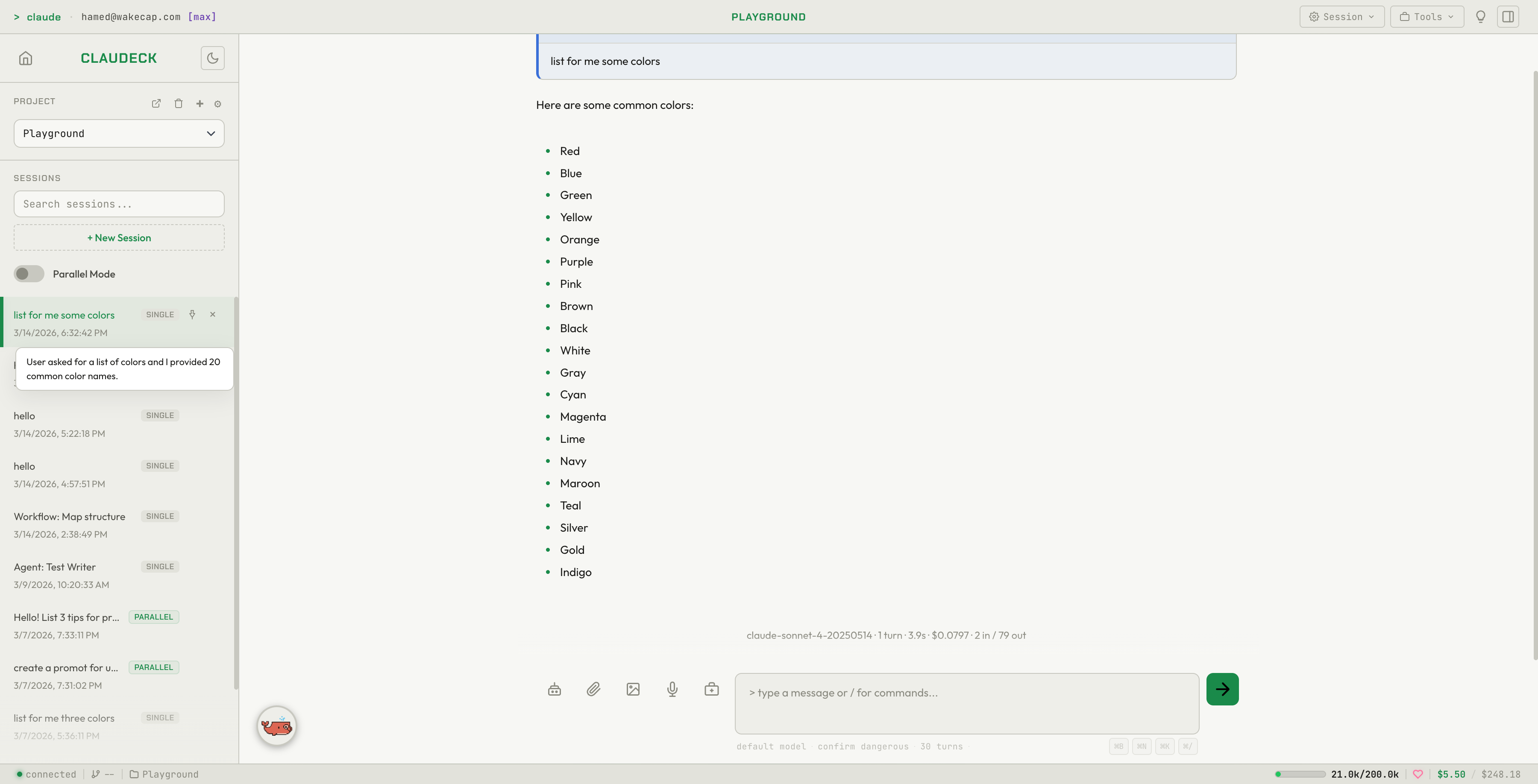
Context switching is painful. You're mid-conversation, need to check something in another session, and now you've lost your place. No tabs, no background sessions, no parallel conversations.
You can't walk away. Claude asks for permission to run a bash command. You're making coffee. The session just... waits. Anthropic recently shipped Remote Control — scan a QR code and approve from your phone via claude.ai. It's a step forward, but it's Max-only ($100–$200/mo), requires your terminal to stay open, and gives you approval control without the broader context — no cost tracking, no session management, no workflows.
No visual tools. File diffs are raw text. There's no file explorer. No git panel. No way to drag a file into the conversation.
No workflows. Every PR review starts with the same three prompts. Every repo onboarding follows the same pattern. But you type them out fresh each time.
I kept a mental list of these annoyances. On March 1st, 2026, I decided to fix them. What I thought would be a weekend project turned into a two-week sprint that I couldn't stop.
What is Claudeck?
Claudeck is a browser-based UI for Claude Code. One command to launch:
npx claudeck
It connects to the official Claude Code SDK running on your machine. Your API key, your local files, your git repos — nothing goes through a third-party server. It's a local web app that gives Claude Code a proper interface.
Think of it as what VS Code is to vim — the same power, but with a visual layer that makes certain things dramatically easier.
The Landscape: Why Not Use Something Else?
When I started building on March 1st, I wasn't thinking about alternatives. By the time I looked up two weeks later with a fully shipped product, there were at least a dozen. Here's the honest picture:
Opcode (20K+ stars, YC-backed)
A polished desktop app built with React and Tauri. Great session management, usage analytics, and custom agent creation. But it's desktop-only — no mobile, no PWA, no browser access. And it requires installing a native app.
CloudCLI (7.9K stars)
The multi-CLI Swiss Army knife. Supports Claude Code, Cursor CLI, Codex, and Gemini CLI. Has a file explorer and git integration. But no cost dashboard, no workflows, no prompt templates, and no parallel chat mode.
CodePilot (3.1K stars)
Electron + Next.js desktop app with model switching and permission controls. Solid, but again — desktop-only, no workflows, no cost analytics, no prompt templates.
Anthropic's Remote Control
Anthropic's own answer: run claude remote-control, scan a QR code, control from your phone via claude.ai/code. But it's Max-only ($100–$200/mo), the terminal must stay open, and there's no file explorer, no analytics, no multi-session management.
So why Claudeck?
Because none of them scratched every itch. I wanted:
- Browser-based — open a tab, start working. No Electron, no Tauri, no native install.
- Cost visibility — know exactly what I'm spending, per session, per day, per project.
- Workflows and templates — stop retyping the same prompts.
- Agent orchestration — not just one agent, but chains, DAGs, and an auto-orchestrator.
- AFK approval — approve tool calls from my phone via Telegram while away from my desk.
- Zero bloat — vanilla JS, 6 npm dependencies, no build step.
No existing tool offered all of these. So I built it.
Features That Matter
I'm not going to list all 50+ features. Here are the ones that changed how I work:
Parallel Mode (2x2 Grid)
Four independent Claude conversations running simultaneously in a grid layout. I use this constantly:
- Pane 1: refactoring a module
- Pane 2: writing tests for it
- Pane 3: reviewing a PR
- Pane 4: exploring documentation
Each pane has its own session, its own context, its own streaming output. No competitor has this.
Cost Dashboard
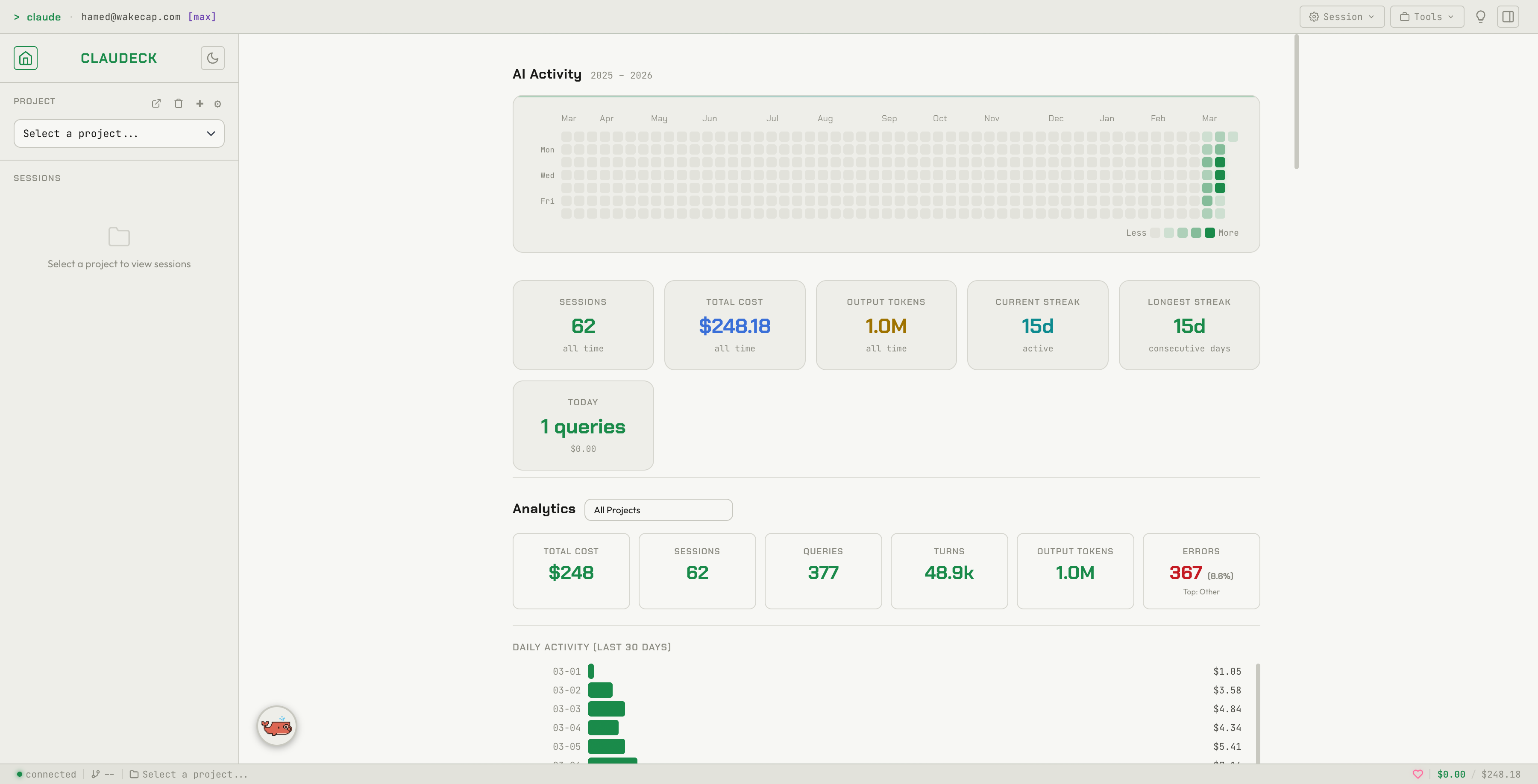
A full analytics dashboard with daily cost charts, per-session breakdowns, input/output token counts, and error pattern analysis. I can see at a glance that Tuesday's refactoring session cost $4.20 across 47 turns, and that 30% of my errors are "File Not Found."
This is the feature that convinced me to make Claudeck public. Every Claude Code user deserves to know where their money goes.
AI Workflows
Pre-built multi-step pipelines:
- Review PR — analyze diff, identify issues, suggest improvements (3 steps, context carries forward)
- Onboard Repo — map structure, explain architecture, generate dev guide
- Migration Plan — audit dependencies, assess impact, create plan
- Code Health — identify tech debt, suggest improvements
You can create your own workflows with full CRUD. Each step carries context from the previous one, so Claude builds on its own analysis.
Autonomous Agents
Four built-in agents (PR Reviewer, Bug Hunter, Test Writer, Refactoring) that run as high-turn autonomous sessions. But the real power is in composition:
- Agent Chains — sequential pipelines: Bug Hunter finds issues, then PR Reviewer analyzes the fixes
- Agent DAGs — visual dependency graphs: Bug Hunter and Test Writer run in parallel, then PR Reviewer synthesizes both
- Orchestrator — describe a task in plain language, and it auto-decomposes into specialist agent calls
I built a full visual DAG editor with an SVG canvas where you drag agents and draw connections. It feels like a simplified version of a CI/CD pipeline builder, but for AI agents.
Telegram Integration (Two-Way)
This is the one people don't expect. Configure a Telegram bot, and:
- Outbound: Every session completion, agent run, workflow step, and error sends a rich notification to your phone with metrics (cost, tokens, duration).
- Inbound: When Claude needs permission to run a tool, you get an inline keyboard on Telegram with Approve/Deny buttons. Approve from your phone, and the web UI modal auto-dismisses.
I built this because I run long agent sessions and walk away. Now I approve bash commands from my couch.
Prompt Templates with Variables
{
  "title": "Code Review",
  "prompt": "Review {{file_path}} for {{concern}}"
}
Click the template, fill in the form, send. Sixteen built-in templates, plus it auto-discovers .claude/commands/ and .claude/skills/ from your project directory.
File Explorer, Git Panel, and Code Diffs
- Lazy-loaded file tree with syntax-highlighted preview
- Git panel with branch switching, staging, commit, and log
- LCS-based code diff viewer with green/red line highlighting for Edit and Write tool outputs
These aren't groundbreaking individually, but having them integrated into the same interface where you're chatting with Claude eliminates constant context switching.
Plugin System
Full-stack plugin architecture. Drop files in ~/.claudeck/plugins/my-plugin/ with a client.js and optionally a server.js, and it appears in the marketplace. Built-in plugins include Linear integration, a todo list with brag tracking, and even a couple of games for when you're waiting on a long agent run.
The best part? You can extend Claudeck using Claude Code itself. I published a Claude Code skill that lets you scaffold new plugins with a single command:
# Install the skill (one-time)
npx skills add https://github.com/hamed-farag/claudeck-skills

# Then in Claude Code, just describe what you want:
/claudeck-plugin-create my-widget A dashboard showing system metrics
Claude generates the full plugin — client.js, client.css, and optionally server.js with Express routes — directly into ~/.claudeck/plugins/. Refresh the page and your plugin is live in the marketplace. No fork needed, no build step, no PR. You describe it, Claude builds it, Claudeck loads it.
The Technical Philosophy
Zero Framework, Six Dependencies
Claudeck's frontend is vanilla JavaScript ES modules. No React. No Vue. No Svelte. No bundler. No build step.
The entire backend runs on Express, WebSocket (ws), better-sqlite3, web-push, dotenv, and the Claude Code SDK. That's it. Six npm dependencies.
Why? Because I wanted to iterate fast. No waiting for builds. No fighting with framework upgrade cycles. No 200MB node_modules. Change a file, refresh the browser.
This choice is a big reason the entire project went from zero to 50+ features in 15 days. When you're building something for yourself, every minute spent on tooling is a minute not spent on features. Vanilla JS with ES modules and CSS custom properties is surprisingly productive when you're not fighting abstractions.
Everything is Local
No cloud. No accounts. No telemetry. Your data lives in ~/.claudeck/ — a SQLite database, some JSON config files, and your plugins. Delete the directory and it's gone.
This was non-negotiable for me. I'm sending code to Claude — I'm not also sending my usage patterns to a third party.
PWA with Offline Fallback
Install it as a PWA from Chrome's address bar. It runs in a standalone window, supports push notifications (even when the browser is closed), and has an offline fallback page. On mobile, it's fully responsive with tablet and phone breakpoints.
What Claudeck Doesn't Do
Honesty matters. Here's where alternatives beat Claudeck:
- No authentication — anyone on your local network can access it. This is the biggest gap and the next thing I'm building.
- No multi-CLI support — CloudCLI supports Claude Code, Cursor CLI, Codex, and Gemini CLI. Claudeck is Claude Code only.
- No desktop app — if you want a native macOS/Windows experience, Opcode and CodePilot are better choices.
- No live file editing — CloudCLI lets you edit files directly in the UI. Claudeck shows file previews but doesn't have an editor (that's what your IDE is for).
Who is Claudeck For?
Solo developers who use Claude Code daily and want visibility into costs, reusable workflows, and a visual interface without leaving the browser.
Developers who work AFK — the Telegram integration means you can kick off a long agent run, walk away, and approve tool calls from your phone.
Power users who want parallel conversations, agent pipelines, and prompt templates — features that the terminal simply can't offer.
Teams evaluating Claude Code who need cost analytics to justify the spend.
Try It
npx claudeck
One command. No install. Opens in your browser. Your first session is free (well, you're paying Anthropic — Claudeck itself is free and open source).
The source is on GitHub: github.com/hamed-farag/claudeck
If you find it useful, star the repo. If you build a plugin, let me know. If you find a bug — definitely let me know.
Claudeck is MIT licensed and has zero telemetry. It went from a blank file to a published npm package in 15 days. It was built for one user (me) and grew into something others might find useful too. That's the best origin story a tool can have.